
Talking Pen Hardware Specification: Memory, Speaker, Battery and Firmware Decisions
A buyer-oriented method for turning a learning concept into a hardware specification that can be sampled, quoted and tested consistently.
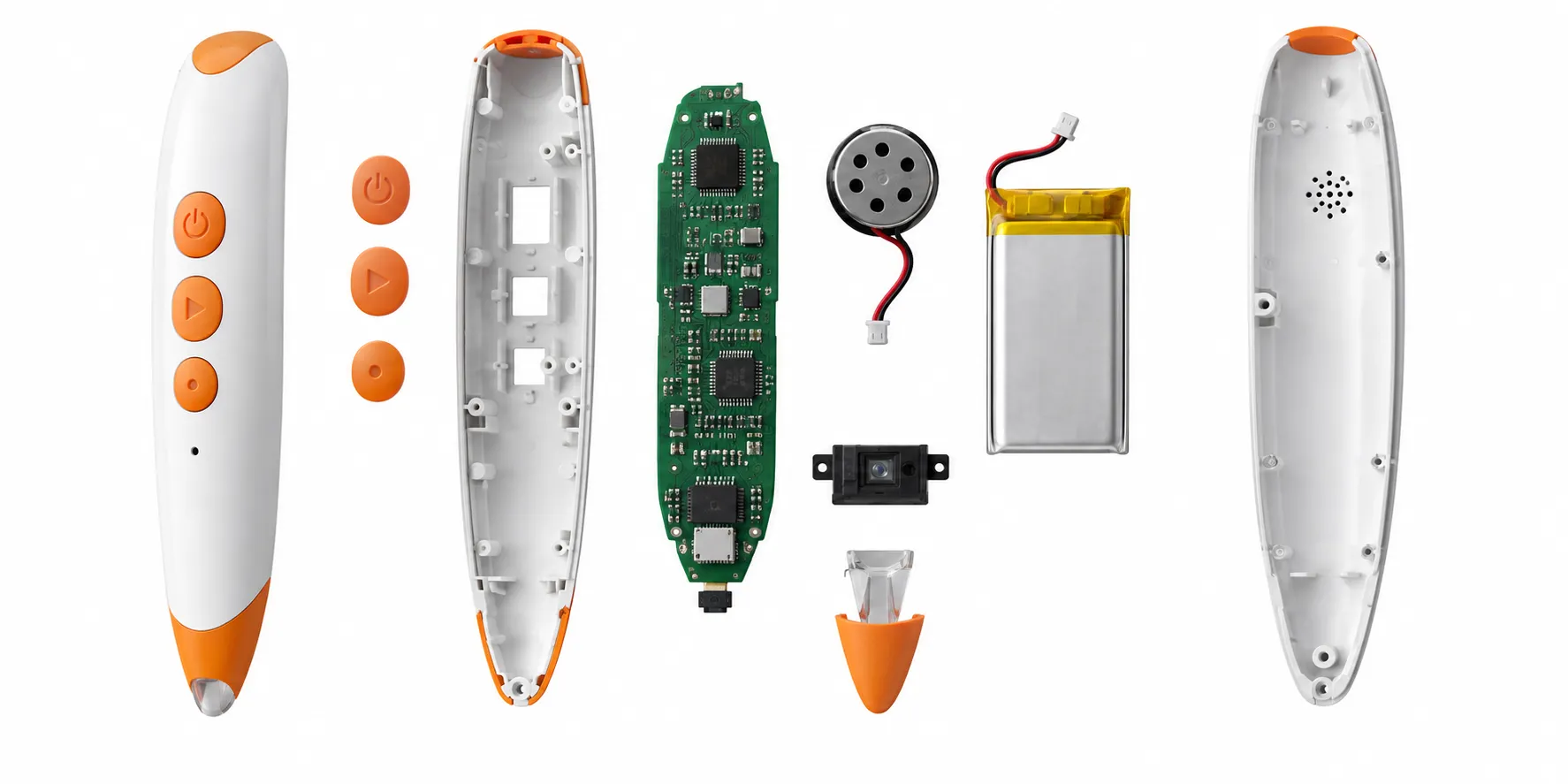
A talking pen specification should describe what the finished product must do and the configuration proposed to deliver it. Buyers sometimes receive a list containing memory, speaker and battery values without knowing why those parts were selected or how they will be tested. That makes two quotations difficult to compare and leaves important behavior to assumptions.
The hardware is inseparable from content. Audio duration and encoding influence memory. Voice clarity depends on source quality, amplifier, speaker and enclosure. Runtime depends on the cell, playback level, sleep logic and learner use pattern. Optical recognition depends on the sensor, firmware and printed materials. Changing one element can affect several others.
This guide focuses on questions and evidence rather than prescribing a universal component. The appropriate design depends on age, product application, target market, price direction and content. Final safety and compliance decisions should be reviewed for the actual configuration by qualified parties.
What should a talking pen hardware specification include?
A talking pen hardware specification should define the optical reading platform, processor and firmware functions, usable memory, audio format, speaker performance, battery and charging system, controls, indicators, housing, accessories and test methods. Every item should connect to the intended content, learner age, approved sample and destination-market compliance plan.
Begin with user behavior. Describe how the child turns the pen on, changes volume, repeats audio, selects a language, enters activities and understands battery status. A component list without operating behavior leaves the firmware and interface undefined. A function list without hardware limits can create features the selected platform cannot deliver efficiently.
Use measurable or observable acceptance criteria where they add value. Instead of requesting 'loud, clear sound,' approve representative speech and music at defined settings on the final enclosure. Instead of promising a universal battery life, define a playback pattern, volume, content build and test condition. Practical criteria reduce disputes and support factory testing.
Identify which configuration details may change after quotation. Component availability can shift between sample and production, but substitutions should require compatibility review and approval. The bill of materials, firmware and test records should preserve the released configuration.
1. Specify the optical reading system and test media
The optical module must be compatible with the selected OID code system and intended print formats. Define whether the pen will support books, cards, posters or worksheets and any planned expansion titles. The supplier should explain code allocation, recognition distance or contact behavior, calibration needs and diagnostic methods without exposing protected platform details unnecessarily.
Sensor performance should be tested with physical production-intent print, not only a standard factory sheet. Include small touchpoints, page edges, dark artwork, different finishes and repeated use. Record correct reads, missed reads and false triggers. The test set should remain controlled so factory results are comparable across lots.
Mechanical alignment matters. The sensor window, tip, housing and internal mounting determine how users position the pen. A child-friendly tip should guide contact while protecting the optical path. Drop, contamination and wear can affect reading, so reliability review should consider foreseeable handling and cleaning instructions.
2. Calculate memory from the released audio package
Memory planning should begin with device-ready audio, not only studio masters. File format, bit rate, sampling settings, language duration and system overhead affect storage. Record representative speech, songs and sound effects, process them using the intended pipeline and calculate the actual package size before freezing memory.
Allow controlled reserve for corrections, metadata, firmware needs and agreed future content. Excess capacity increases cost without automatically improving the product, while too little capacity forces late compression or hardware change. If expansion books are part of the business model, define how new packages are installed and how compatibility with earlier titles will be maintained.
The specification should distinguish advertised capacity from usable content capacity. File systems, firmware and reserved areas consume space. Production programming should verify package version, file count or checksum where supported. A unit that powers on with an incomplete audio library is still defective.
| Memory input | Why it matters | Evidence |
|---|---|---|
| Audio duration by type | Speech, music and effects compress differently | Representative processed package |
| Languages | Translated recordings can have different lengths | Locale-specific file totals |
| Firmware and system reserve | Not all nominal memory is available | Usable-capacity statement |
| Expansion plan | Future titles may need reserve or update workflow | Documented compatibility approach |
3. Evaluate speaker and audio performance inside the enclosure
Speaker diameter or wattage alone does not define perceived quality. The amplifier, enclosure cavity, vents, assembly sealing, audio processing and source recordings interact. Test representative voices in every required language, quiet phonemes, energetic music and sound effects through the final or production-intent housing.
Define an appropriate volume range for the use environment and intended age. Maximum loudness is not the only goal; speech should remain intelligible at normal settings without objectionable distortion, rattling or abrupt level changes between files. Audio normalization and consistent mastering often improve the experience more than a larger speaker.
Factory tests should detect wrong speakers, poor soldering, blocked vents, distortion and incorrect files. A fixture or controlled audio sequence can improve consistency, but listening checks and objective measurements have different purposes. Agree on the method and its limits rather than writing '100% sound test' without details.
4. Choose battery, charging and low-power behavior together
The power architecture may use replaceable batteries or a rechargeable cell depending on age, market, price, environmental goals and product design. Evaluate battery access, fasteners, polarity, charging connector, cable, protection circuit, temperature, foreseeable misuse and end-user instructions. A cosmetic preference for a connector should not override safety or structural review.
Runtime claims need a test profile. Playback volume, average clip length, pause intervals, indicator behavior and sleep logic all influence the result. Define the content package and cycle used for comparison. Separate continuous playback from a representative-use estimate, and avoid marketing a number that the approved configuration has not supported.
Charging behavior belongs in firmware and quality control. Confirm indicator states, charge termination, operation during charging if allowed, low-battery prompts, automatic shutdown and recovery. Production records should identify the approved cell and charging components. Lithium battery transport documentation may also be required for shipment planning.
5. Define controls, indicators and child usability
Buttons should match hand size, force, travel and expected supervision. The icon, physical shape and spoken response should make each function understandable. Hidden button combinations can reduce openings in the housing but may be difficult for children or caregivers. Test the interface with the target user profile before final tooling.
Language selection, volume limits, repeat and mode changes need explicit state behavior. Decide what the pen remembers after power-off, what happens when audio is interrupted and how an unsupported touchpoint responds. These details belong in the specification and sample checklist because they are difficult to infer from the shell.
Indicators should communicate necessary information without creating confusion or unnecessary power use. Light color, blink pattern and audio prompts must be consistent with the manual. If the product is intended for low-vision or multilingual use, do not depend on one visual cue or unlocalized voice prompt for essential operation.
6. Control firmware, content installation and version changes
The firmware function list should identify standard and custom behavior. Record startup, buttons, volume, language, modes, reading logic, file lookup, error handling, sleep, charging and update method. A version number without a released function description does not tell production or inspectors what to expect.
Content installation preparation should link the approved firmware, audio package, mapping sheet and SKU. Restrict programming stations to current releases and remove obsolete builds. Verification may use a diagnostic code, checksum, file count, spoken version or controlled test page depending on platform capability.
Every change needs regression testing proportional to its impact. A small audio correction may still affect file order or package size. A firmware change to language switching can affect startup, memory and button states. Record changed functions and retest critical unchanged behavior so the correction does not create a new defect.
7. Turn the specification into sample and factory tests
Build an approval matrix that maps each requirement to evidence. Visual items may use the signed sample and color reference. Functional items use a step and expected response. Memory and firmware use version records. Audio uses approved source files and device playback. Power uses defined conditions. The matrix becomes the bridge between engineering and quality control.
Pilot production should confirm repeatability, not just one perfect unit. Pull samples across the batch and check recognition, audio, buttons, charging, assembly, appearance and content installation. Review defect patterns and update work instructions or fixtures before the full order continues.
Final shipment inspection should verify the released model and sample representative functions, content, appearance, accessories, labels and packaging. Acceptance sampling does not replace product-safety testing or process control. Critical safety concerns require their own disposition regardless of the overall defect count.
How to turn a feature wish list into an approvable hardware specification
Write measurable requirements
Replace phrases such as loud sound, long battery life and fast response with conditions that can be tested. State the audio material used, volume setting, battery condition, ambient environment and acceptance method. Response time should identify the event being measured—from a valid code read to the start of audible output, for example. Measurable language helps engineering choose components and gives quality teams a repeatable inspection method.
Prioritize requirements as mandatory, preferred or optional. A compact housing, large speaker cavity, high-capacity battery, low weight and low cost can conflict. The priority list lets the team resolve those conflicts without quietly sacrificing a critical user need. Record approved deviations and their consequences in the configuration sheet.
Evaluate the complete signal path
Reading accuracy depends on the optical sensor, lens position, illumination, code print and firmware processing. Audio quality depends on the source file, codec, amplifier, speaker, acoustic cavity and grille. Battery performance depends on cell capacity, power-management behavior, volume, duty cycle and sleep logic. Evaluating a component in isolation can hide a system weakness.
Use production-intent samples for verification. A development board powered from a bench supply does not represent the final battery path, and an open speaker does not represent the closed enclosure. Test low-battery behavior, charging or cell replacement, repeated reading, maximum-volume playback and recovery after interruption. Capture firmware version and component lot for each result.
Create the golden sample and change rules
The golden sample should be linked to drawings, BOM, firmware checksum, audio package, approved materials and the printed test media used for reading checks. Cosmetic approval alone is insufficient. Inspectors need a reference for buttons, LEDs, startup, volume, language, touch response, speaker output, accessories and packaging.
Define which substitutions require buyer approval. Memory, speaker, battery, sensor, PCB, plastic resin and coating changes may affect performance or compliance evidence. A supplier may need flexibility when components become unavailable, but the replacement process should require documented equivalence, engineering verification and updated records rather than an informal line decision.
Frequently asked questions
How much memory does a talking pen need?
Calculate memory from processed device-ready audio for all languages, plus firmware, file-system overhead and an agreed reserve. Nominal capacity alone does not show usable content space.
Does a larger speaker always improve a talking pen?
No. Source audio, amplifier, enclosure cavity, vents and assembly determine the result. Approve representative playback in the final housing at usable volume settings.
Which battery is best for a talking pen?
The choice depends on age, market, runtime target, charging design, cost and safety review. Evaluate the complete power and enclosure system rather than selecting a cell by capacity alone.
What firmware functions should be listed?
Document startup, buttons, volume, repeat, language and mode switching, reading logic, errors, sleep, charging behavior and update or programming method.
Can the manufacturer change a component after sample approval?
Only through a controlled change process. The supplier should identify the proposed substitute, assess functional and compliance impact, provide evidence and obtain approval before production use.
What should shipment inspection test on a talking pen?
Verify model, firmware and content version, optical recognition, audio, buttons, indicators, charging or battery behavior, assembly, appearance, accessories, labels, books and packaging.
Conclusion
A useful talking pen hardware specification connects every component to a learner experience and an approval method. Memory, audio, power, controls, optical reading and firmware should be evaluated as one platform, not as independent catalogue options.
Record the released configuration, prove it with representative content and translate it into repeatable factory tests. That discipline gives buyers clearer quotations, more meaningful samples and stronger control from pilot production through shipment inspection.
Authoritative references
Requirements change and differ by product. Use the current official source and qualified professional advice for the final project.