
Logic Learning Toy Activity Design: From Learning Goal to Tested Product
A content and hardware framework for matching, sequencing, classification, memory and early problem-solving activities.
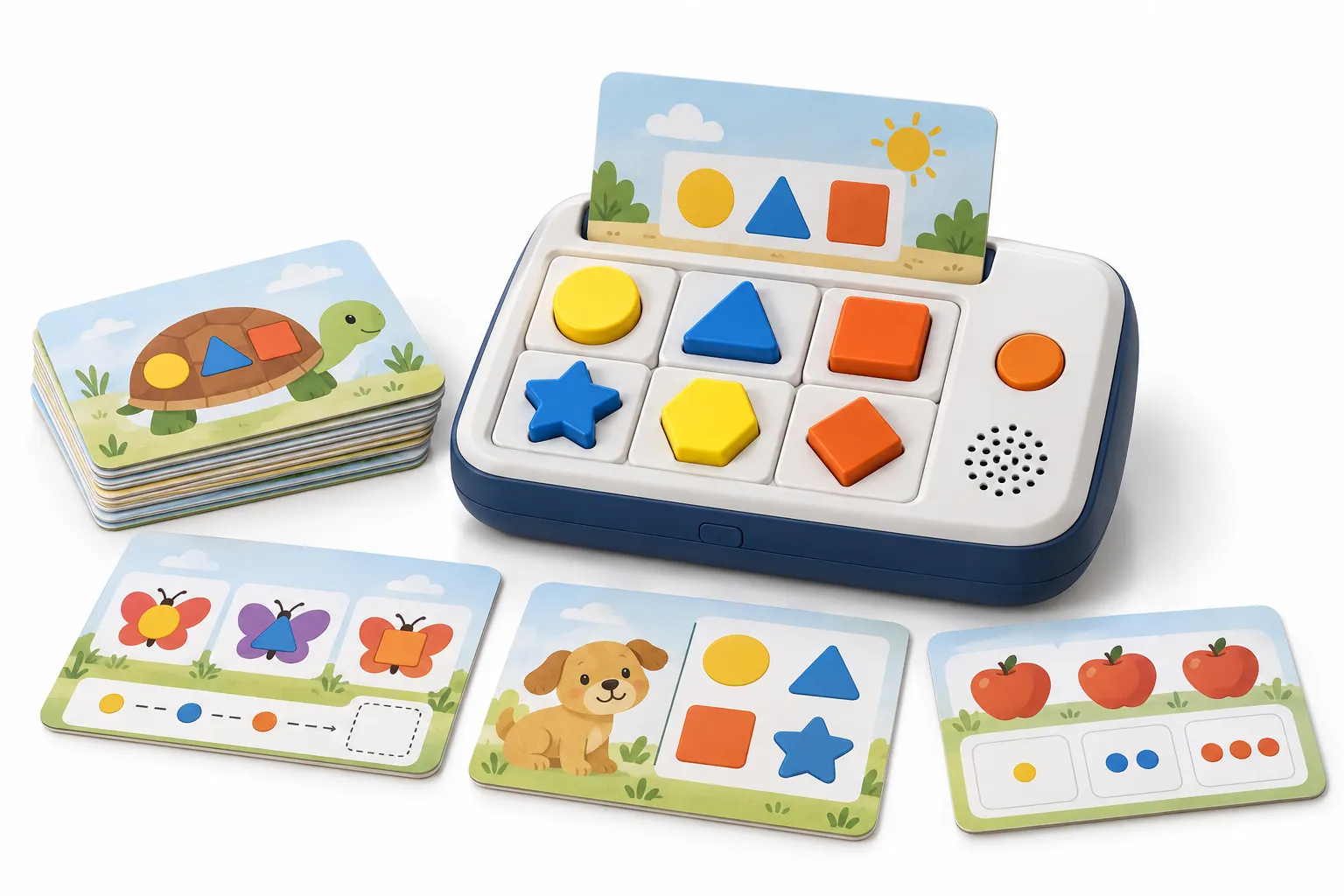
A logic learning machine should do more than confirm random choices. The activities need a clear cognitive goal, an answer method the child can understand, difficulty that grows deliberately and feedback that supports another attempt. Hardware, cards and content should be designed as one learning system.
Physical constraints shape the curriculum. The number of answer positions, size of pieces, card area, sensor method, audio duration and storage determine what can be presented. A worksheet that works on paper may become ambiguous when reduced to a small card or limited to four answer buttons.
This guide provides a development framework rather than educational claims. Qualified content specialists should review learning outcomes and age suitability, while the factory validates mapping, physical use, electronics, production and quality controls.
What makes a good logic learning toy activity?
A good logic learning toy activity has one understandable objective, age-appropriate visual information, an unambiguous answer, a physical response children can perform, clear feedback, deliberate difficulty progression and a controlled mapping between activity card, answer position, firmware and audio. It should also remain legible, durable and testable in mass production.
Begin with the reasoning process: match, sort, sequence, count, classify, identify a pattern, remember a position or choose a consequence. The child should know what to do from the visual and audio instruction. Avoid adding decoration that suggests another plausible answer.
Correctness is only one part of feedback. The product can confirm, encourage another attempt, explain or advance. Keep responses short enough to preserve flow. Define what happens after repeated errors and whether an adult-guided mode is available.
Create stable activity IDs that connect card artwork, question, options, correct answer, explanation, audio, language and level. The database becomes the source for content review, firmware mapping and production inspection.
1. Translate learning goals into observable tasks
Define the learner age, prerequisite skills and intended setting. A preschool matching task should use concrete images and limited choices, while older learners can compare rules or sequences. Do not use one broad age range for every card simply because the housing remains the same.
Write an objective for each activity family. For example, classify familiar objects by use, continue an alternating pattern or identify the missing step in a daily routine. The objective guides illustration, wording and answer format.
Review whether the device adds value. Audio may clarify instructions, model language or give feedback. Physical pieces may support hands-on reasoning. Avoid electronics that only announce a correct answer without improving accessibility or engagement.
2. Choose a physical answer method that fits the child
Answer methods can include buttons, movable pieces, tiles, slots, sliders or touch areas. Evaluate grip, force, reach, orientation and reset. Pieces for younger users require careful size and safety review. Controls should not reveal the answer through inconsistent resistance or alignment.
The number of options affects difficulty and hardware. Too many small choices can overwhelm the learner and reduce illustration clarity. A fixed four-position device may need different card designs for binary, sequence and category tasks so unused positions do not confuse the child.
Design card insertion and registration so the machine knows which activity is present and the artwork aligns with answer positions. Test partially inserted, reversed or unsupported cards. Provide understandable feedback without damaging the card or locking the user in an error state.
3. Write unambiguous questions and answer choices
Use simple language and familiar context appropriate to the target market. One question should test one concept. If multiple answers could be defended, revise the artwork or instruction rather than expecting the child to infer the author's intention.
Distractors should be plausible enough to require thought but not misleading. Avoid cultural knowledge that has not been taught. For multilingual products, confirm that translation does not change the logic or make one option grammatically obvious.
Document rationale for the correct answer and have a second reviewer independently solve the activity. Pilot with representative users under appropriate ethical and supervision practices where possible. Record confusion as design evidence, not user failure.
4. Build a progression of topics and difficulty
Progression can increase the number of attributes, length of sequence, abstraction, memory delay or independence required. Do not confuse visual busyness with cognitive difficulty. Keep the interaction method stable while one learning variable changes.
Group cards by level or skill and make storage understandable. Caregivers should be able to select an appropriate subset. Use numbering, color or symbols carefully so the level marker does not accidentally reveal the answer.
Plan expansion sets with reserved IDs and documented prerequisites. A future pack should state compatible hardware and firmware. Preserve core terminology and illustration conventions so the product family feels coherent.
| Difficulty lever | Easier form | More advanced form |
|---|---|---|
| Choices | Two distinct options | Several similar options |
| Attributes | Match one visible feature | Classify by two or more rules |
| Sequence | Two-step order | Longer pattern with missing element |
| Support | Spoken and visual cue | Independent visual inference |
5. Design feedback that supports learning and repetition
Correct feedback can confirm and briefly reinforce the concept. Incorrect feedback should remain neutral and offer another attempt. Avoid harsh sounds or language. Decide when the product reveals the answer and how an adult can reset or repeat the instruction.
Use consistent audio patterns so learners understand system states. Differentiate question, selection, correct, retry, completion and low-power prompts. Keep sound effects secondary to speech clarity and test them through the final speaker.
If the product tracks scores or sequences, explain data behavior and privacy implications. Many screen-free products can deliver useful feedback without collecting personal data. Avoid unnecessary complexity that creates support or compliance burden.
6. Map cards, answers, audio and firmware
The release database should link activity ID, card identifier, level, instruction, option positions, correct response, feedback files and language. Generate device packages from controlled data where possible and validate the complete map before production.
Test edge cases: repeated pressing, two pieces placed together, card removal during audio, power interruption and wrong-language packaging. The firmware should fail safely and recover clearly. Document expected behavior for inspectors.
Use production-intent cards and pieces. Print scaling, cutting and sensor alignment can change mapping. A digital simulation cannot prove that the physical answer positions register correctly.
7. Sample, pilot and inspect the complete activity system
Sample representative activities from every type and difficulty. Review content accuracy, artwork, legibility, answer mapping, physical handling, audio and package storage. Track changes across all languages and re-test unaffected critical functions after updates.
Pilot production should verify card printing, identifiers, piece dimensions, sensor alignment, firmware installation and pack-out. Inspect yield and defect patterns. A hand-adjusted prototype is not proof that the line can reproduce alignment.
Shipment inspection should select finished sets across cartons and confirm complete card and piece counts, correct language, representative answer mapping, audio, controls, instructions and packaging. Preserve lot traceability for reported activity defects.
Review an activity set with children, educators and production evidence in mind
Use a structured ambiguity review
Give reviewers the card without the answer key and ask them to state the instruction, intended skill and defensible answers. Record hesitation and alternative interpretations. If adults need explanation, a child is unlikely to resolve the ambiguity independently. Revise the image, wording or options rather than adding a longer recorded instruction to compensate for a confusing layout.
For translated sets, repeat the review in each language. Grammar, noun class, word order or cultural familiarity can accidentally reveal the correct answer or invalidate a distractor. Maintain a rationale for every answer and a record of educational and native-language approval. The rationale also helps customer service explain an activity consistently.
Pilot interaction, not only content correctness
Observe whether users understand where to place a piece, how firmly to press, how to repeat an instruction and what feedback means. Note reach, grip, card orientation and reset behavior. A correct curriculum can still fail if pieces cover essential artwork, the child cannot remove them or the device gives feedback before the choice is complete.
Use pilot observations to refine progression and session length. Track where repeated error reflects a difficult concept and where it reflects unclear presentation. Avoid making learning claims from a small informal session; its purpose is usability discovery. Formal educational efficacy claims require appropriate study design and evidence.
Translate the activity library into inspection points
Select test cases from every interaction type, answer position, difficulty band and language. Include edge cases such as rapid repeated input, wrong card orientation, removal during feedback and low power. The test list should reference stable activity IDs so content corrections and firmware behavior can be traced.
At pack-out, verify complete card and piece counts, level grouping, storage, instructions and compatibility labeling. During shipment inspection, combine fixed critical cases with random activities. This approach can find mapping and pack-out errors without pretending that a few successful demonstrations prove every content item in the entire library.
Maintain a coverage matrix that shows which activities were reviewed for curriculum, translation, illustration, firmware mapping, pilot use and production inspection. Gaps become visible before release. The matrix is especially valuable when a large card library is divided among several reviewers or updated in multiple languages on different schedules.
For customer support, give each activity and accessory pack a visible version identifier. A reported wrong answer can then be traced to a specific card, language and firmware combination. Without version identity, teams may reproduce the wrong edition and issue a content correction that does not address the customer's actual product.
Keep the same identifiers on inspection records, replacement packs and digital source files so support evidence returns to the correct production baseline.
Frequently asked questions
What skills can a logic learning machine support?
Depending on design, activities may cover matching, sorting, sequencing, counting, classification, visual discrimination, memory and early problem solving. Claims should match reviewed content.
How many answer choices are appropriate?
It depends on age, task and physical layout. Use enough choices to support the intended reasoning without reducing clarity or making controls difficult to use.
Should incorrect answers play a negative sound?
Neutral, encouraging feedback is generally more supportive. Define retry and answer-reveal behavior with educational reviewers and test it with the target user experience.
Can the same machine support multiple difficulty packs?
Yes if card identification, firmware, mapping and physical layout are planned for expansion. Label compatibility and preserve reserved IDs.
Who approves logic activity content?
Use qualified educational or subject specialists and native reviewers, plus independent solving and practical user evaluation appropriate to the project.
What should factory testing cover?
Test card recognition, answer positions, feedback, audio, controls, firmware version, printed card quality, pieces, complete counts and the correct language package.
Conclusion
Logic learning toy activity design begins with a reasoning objective and ends with a manufacturable, testable physical system. Clear questions, unambiguous answers, deliberate progression and supportive feedback matter more than the number of cards.
Use stable content data and test production-intent cards, pieces and firmware together. That protects educational intent while giving the factory a clear map for assembly, programming and shipment inspection.
Authoritative references
Requirements change and differ by product. Use the current official source and qualified professional advice for the final project.